Networking
Network Overview
UTHPC managed Kubernetes uses internal Pod and Service networks. Applications running inside the cluster are therefore not directly reachable from external networks by default.
External access must be provided using one of the supported methods described below.
Network overview
- Web applications (HTTP/80, HTTPS/443): Published through the managed proxy and Kubernetes Ingress.
- Authenticated web apps: Published through Pomerium Ingress for UT user access.
- Non-HTTP or arbitrary port traffic: Published using a
LoadBalancerService,NodePort, or custom TCP proxy. - Internal security: All namespaces enforce a default-deny
NetworkPolicyfor incoming traffic. - Outgoing traffic: Originates from
egress.kubernetes.hpc.ut.ee(193.40.46.6).
Topology
There are several ways traffic can enter and leave the Kubernetes cluster.
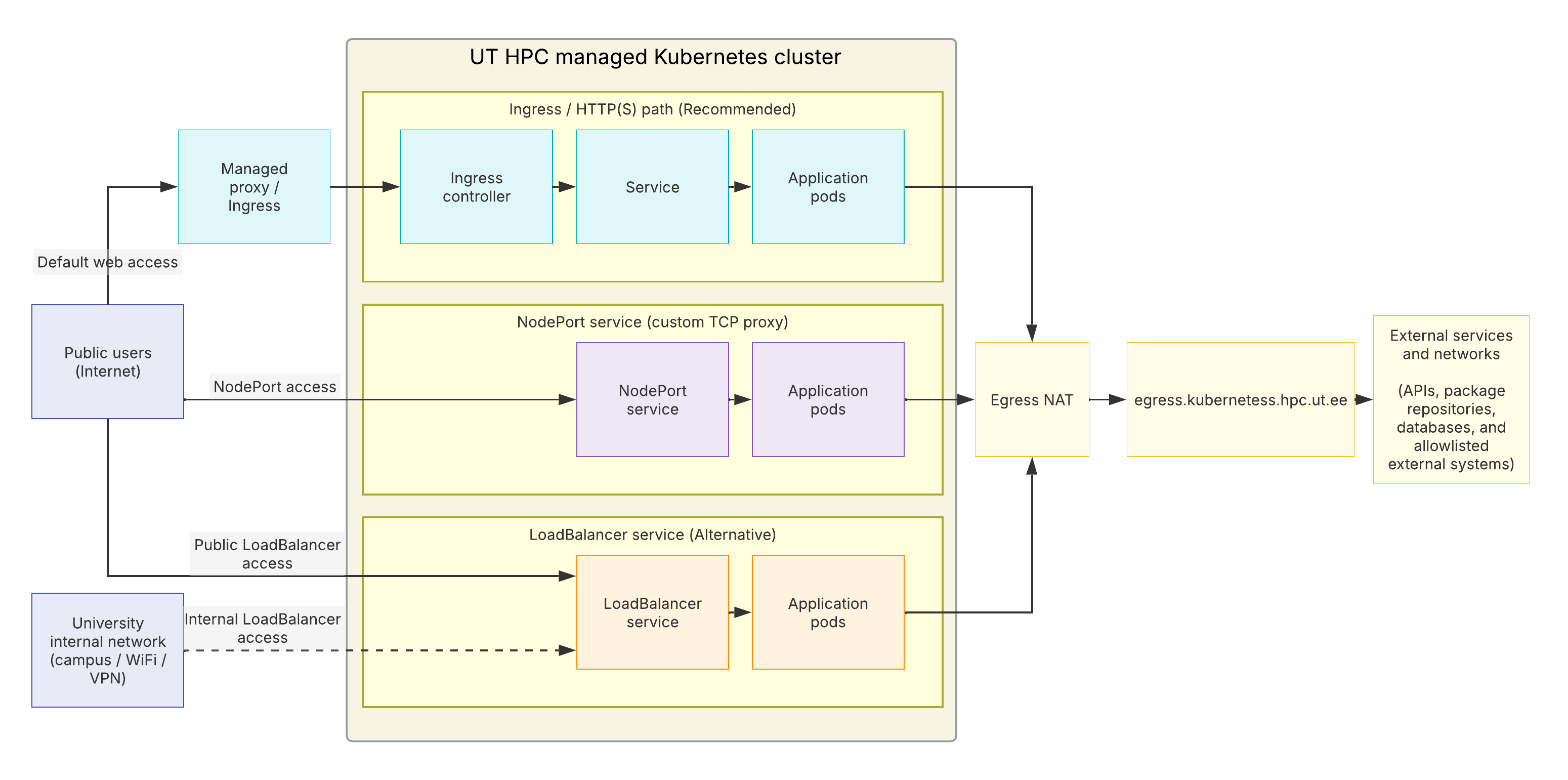
Ingress Traffic (Incoming Connections)
Default Web Access
For HTTP and HTTPS applications, the primary and recommended path is the UTHPC managed proxy (proxy.hpc.ut.ee) and Kubernetes Ingress infrastructure.
Public User / Client
    │
    ▼
UTHPC Managed Proxy (proxy.hpc.ut.ee)
    │
    ▼
Kubernetes Ingress via the Ingress Controller (Traefik / Pomerium)
    │
    ▼
Kubernetes Service
    │
    ▼
Application Pods
This method supports: * Standard Web Ingress: Accepts traffic on ports 80 (HTTP) and 443 (HTTPS). TLS certificates and security rules are managed by UTHPC. * Authenticated Ingress (Pomerium): Restricts access to authenticated University of Tartu users or specific user lists using single sign-on.
See Ingress Documentation for step-by-step setup instructions.
Direct Access Using a LoadBalancer Service
A Kubernetes LoadBalancer Service provides a network address that routes traffic directly to the application Service.
UTHPC Kubernetes provides two LoadBalancer networks.
| LoadBalancer type | Subnet | Intended access |
|---|---|---|
| Campus | 172.16.232.0/24 | University network, University WIFI and VPN |
| Public | 193.40.46.0/24 | Public internet |
Client
   │
   ▼
LoadBalancer IP (Campus or Public)
   │
   ▼
LoadBalancer Service
   │
   ▼
Application Pods
See LoadBalancer Service Documentation for allocation labels and NetworkPolicy requirements.
Unlike the standard Ingress path, a LoadBalancer can be used for arbitrary TCP or UDP ports.
A public LoadBalancer gives the application direct network exposure and should therefore only be used when such access is required. Access must also be explicitly permitted by the namespace NetworkPolicy.
NodePort Services
A NodePort Service exposes an application on a high-range port across all Kubernetes cluster nodes. It is primarily used as an infrastructure building block or when integrating with custom TCP proxies.
Client / External TCP proxy
        │
        ▼
 Kubernetes Node IP:NodePort
        │
        ▼
 Application Pod
NodePort is intended for special cases rather than normal application publishing.
This can be useful when:
- the application does not use HTTP or HTTPS;
- direct public LoadBalancer exposure is undesirable;
- access needs to be restricted or centrally managed;
- a proxy needs to dynamically select Kubernetes nodes hosting the application.
Traffic Source IP Preservation: By default, NodePort traffic may be routed between nodes, masking the client's actual IP address behind a node IP. To preserve client source IPs for security filtering or logging, set:
spec:
  externalTrafficPolicy: Local
Note: With externalTrafficPolicy: Local, connections are only handled by nodes actively running a pod for that service. Custom proxy routing via NodePort usually requires coordination with UTHPC administrators.
Internal Kubernetes Networking
Pod IPs and ClusterIP Service addresses are purely internal to the cluster.
They are used for communication such as:
Pod ─────────────► Pod

Pod ─────────────► ClusterIP Service ─────► Pod

Ingress ─────────► Service ────────────────► Pod
-
Pod IP addresses are ephemeral and will change when pods restart.
-
Applications within the cluster should communicate using internal Kubernetes Service names rather than Pod IP addresses.
Network Policy Enforcement
Every namespace in the UTHPC cluster is provisioned with a default NetworkPolicy that denies all incoming traffic.
Creating a LoadBalancer or NodePort Service makes the endpoint network-routable, but traffic will be dropped unless an explicit NetworkPolicy allows it:
External client
      │
      ▼
LoadBalancer / NodePort
      │
      ▼
NetworkPolicy Evaluation
      │
      ├── Allowed ──► Application Pod
      │
      └── Denied  ──X (Traffic Dropped)
Security Responsibility
Always follow the principle of least privilege. Only allow necessary source IP ranges, protocols, and ports in your namespace's NetworkPolicy.
Egress Traffic (Outgoing Connections)
Applications running inside Kubernetes can freely initiate outgoing connections to external networks. Outgoing traffic is translated via Source NAT (SNAT) through the cluster egress gateway.
Application Pod
      │
      ▼
Kubernetes network
      │
      ▼
Egress NAT
      │
      ▼
egress.kubernetes.hpc.ut.ee
      │
      ▼
External Destination
The externally visible Kubernetes egress endpoint is:
egress.kubernetes.hpc.ut.ee
For example, this address may need to be added to your network allow list when a Kubernetes application connects to:
- an external database;
- an API;
- a software repository;
- another protected service;
- an external firewall-protected system.
Egress Identification
| Parameter | Value |
|---|---|
| Egress hostname | egress.kubernetes.hpc.ut.ee |
| Current IPv4 Address | 193.40.46.6 |
egress.kubernetes.hpc.ut.ee is the authoritative egress endpoint. The IP addresses associated with it may change as infrastructure is updated. To get the correct IPv4 address run dig +short A egress.kubernetes.hpc.ut.ee.
Choosing the Right Solution
| Requirement | Preferred Solution | Notes |
|---|---|---|
| Public website or REST API | Ingress | Port 80/443 only. Managed TLS and routing. |
| Internal Website with UT Login | Pomerium Ingress | Integrates Single Sign-On for UT users. |
| Non-HTTP Service (UT Internal) | Campus LoadBalancer | Subnet 172.16.232.0/24. Requires NetworkPolicy rule. |
| Non-HTTP Service (UT Internal) | Public LoadBalancer | Subnet 193.40.46.0/24. Requires NetworkPolicy rule. |
| UDP Traffic | LoadBalancer | Standard Ingress supports TCP/HTTP only. |
| Custom Infrastructure / TCP Proxies | NodePort | Requires manual node routing or custom configuration. |
For normal web applications, use Ingress. Use the other exposure methods only when the application cannot use the standard HTTP/HTTPS path.